
When a tenant moves out, terminate them. Terminating ends the lease, marks the unit vacant so you can lease it again, pauses any automatic payments on the lease, and settles the tenant's credits — including the security deposit — and any open balance.
Terminating can't be undone from the tenant record. Record any final payments and charges first.
Start the termination
- Open the tenant and click the Settings tab.
- Under Danger Zone, next to Terminate tenant, click Terminate.
The Terminate tenant wizard opens. It shows only the steps this tenant needs, based on their balance and credits, followed by Review.
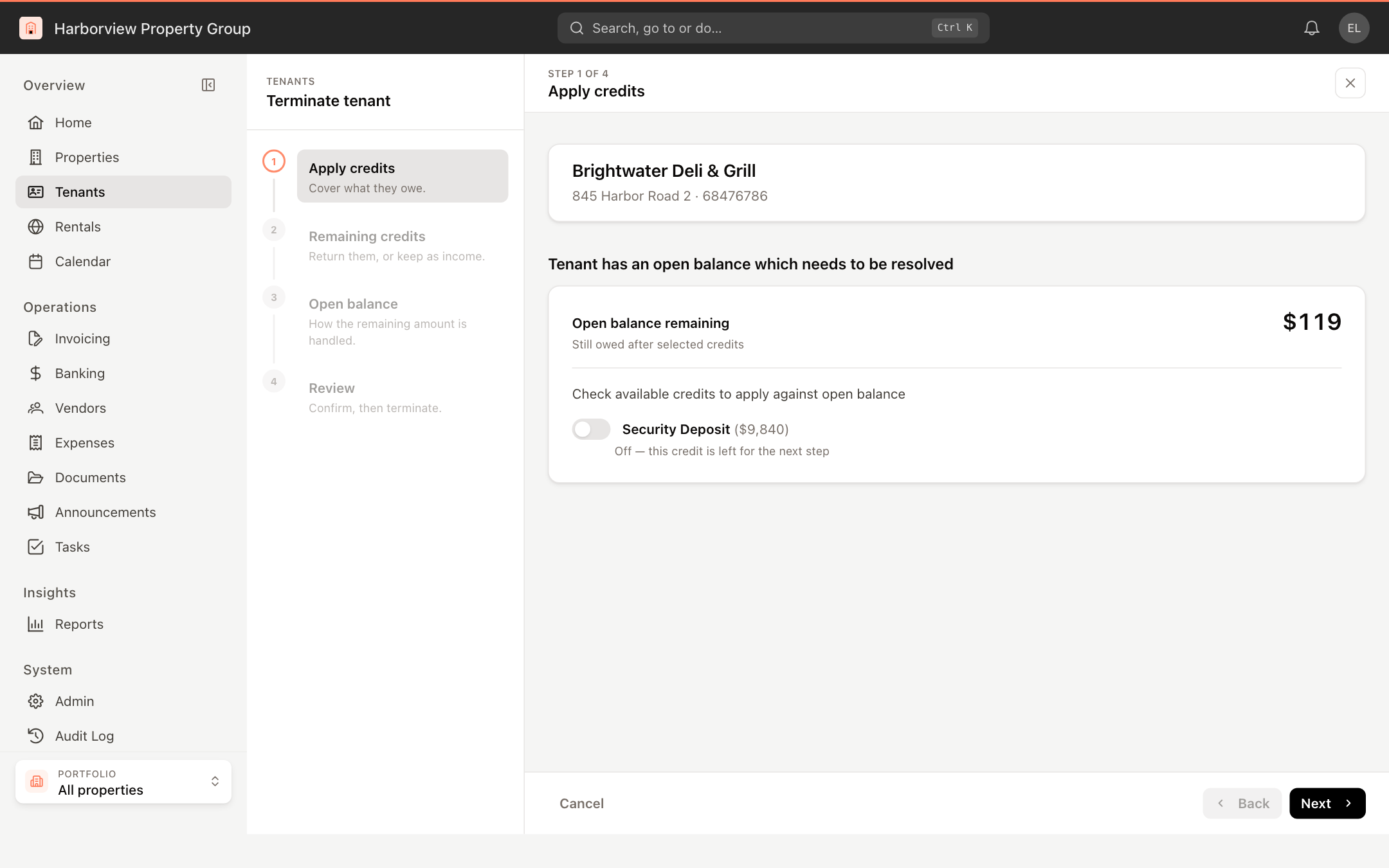
Apply credits
Shown when the tenant owes money and has credits, such as a security deposit.
- Turn on each credit to apply against the open balance. The panel shows how much will be applied and the Open balance remaining.
- Optional: click the settings button next to a credit to set the Paid On date and a Reference, then click Apply.
- Click Next.
Remaining credits
Shown when credits are left over. Turn the switch on to pay the leftover back to the tenant from the property bank account, or leave it off to keep it as other income. Click Next.
Open balance
Shown when the tenant still owes money after credits.
- If the tenant is paying the rest now, turn on Is Tenant paying the remaining balance… and enter Paid On, Payment Type (Cash, Check or Other) and an optional Reference. The invoice is marked as paid.
- If the tenant will pay later, leave that off and turn on Does the Tenant promise to pay later?
- With both off, the remaining charges are written off.
If the tenant is paying only part of the balance, cancel, record that payment on the invoice first, then terminate.
Review and terminate
The Review step summarizes what happens to each credit and to the open balance. If there was nothing to settle, it says so. Click Terminate.
The tenant is marked Terminated, and the unit becomes vacant. A tenant portal user with other leases keeps access to those; only this lease's access ends.
Terminating a tenant requires permission to deactivate tenants. Without it, the Terminate button is disabled.
Find terminated tenants
In the tenant list, open Filters and set View to Terminated.