
Many commercial leases give the tenant the right to renew for one or more extra terms. UnitConnect tracks these in two places:
- Options in Lease Info records how many options the lease grants and how long each is, for example 2 × 5yr.
- Option periods in the Rent Breakdown hold the rent for each option term, with the number of days' notice the tenant must give to exercise it.
Record the options in the lease terms
When you create the tenant, turn on Renewal options on the Lease & Rent step and enter the Number of options and Years per option. The Lease tab then shows them under Options.
Add an option period
- Open the tenant and click the Lease tab.
- In the Rent Breakdown header, click +.
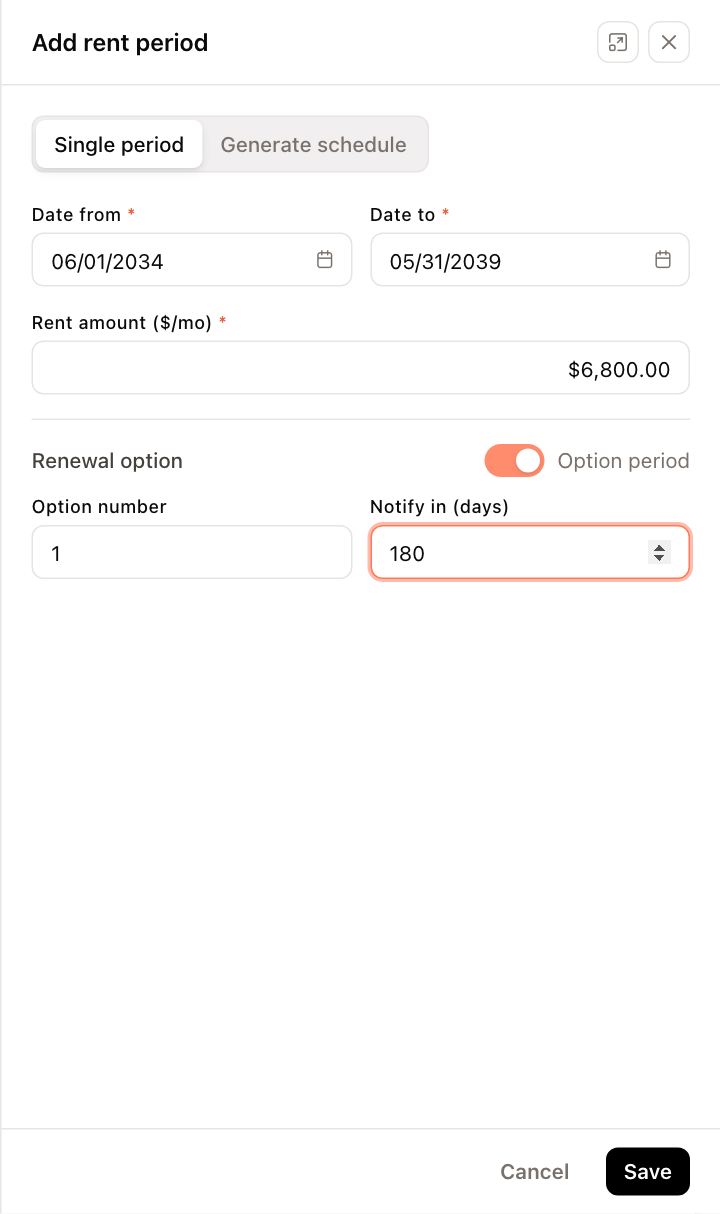
- Enter Date from, Date to and Rent amount ($/mo) for the option term, for example 06/01/2034 to 05/31/2039 at $6,800.
- Under Renewal option, turn the switch on. It changes from Base rent to Option period.
- Enter the Option number (1 for the first option, 2 for the second, and so on) and Notify in (days) — how many days before the option term the tenant must give notice.
- Click Save.
The period appears under its own Option # band at the bottom of the rent breakdown, with the notice window, for example Option #1 · notify 180 days ahead.
If the option term has escalating rent, click Generate schedule instead of entering a single period, and turn on Renewal option before you click Save schedule. Every generated period gets the same option number and notice days.
Mark existing periods as options
- Select the periods in the Rent Breakdown.
- Click Selected (N), then Update selected (N).
- Turn on the switch on each row (it changes from Base to Option) and enter Option # and Notify (days). To set the same values on every row, use Apply to all with Option # or Notify days.
- Click Save N row(s).
Reminders
- The tenant's Overview lists Option exercise window approaching under Needs Attention when a notice window is near.
- To also notify the tenant, turn on the Exercise of Option notification on the tenant's Settings tab. See Tenant portal access and notifications.