
The Lease Info card on a tenant's Lease tab holds the terms of the lease: the dates, when rent is due, the deposit, the tenant's pro-rata share, insurance details and any late or admin fee.
Review the lease terms
Open the tenant, click the Lease tab, and look at Lease Info:
| Field | What it means |
|---|---|
| Lease period | Lease start → lease end |
| Rent due day | The day of the month rent is due |
| Deposit | The security deposit held |
| ProRata share | The tenant's share of the property, used for pro-rata passthroughs |
| Insurance exp. | When the tenant's certificate of insurance expires |
| Options | Renewal options, for example 2 × 5yr |
| Possession | When the tenant took possession of the space |
| Rent start | When rent began (rent commencement) |
| Late fee / Admin fee | The fee and how it is calculated, or Not charged |
| Liability insurance | Whether the lease requires the tenant to carry it |
Change the lease terms
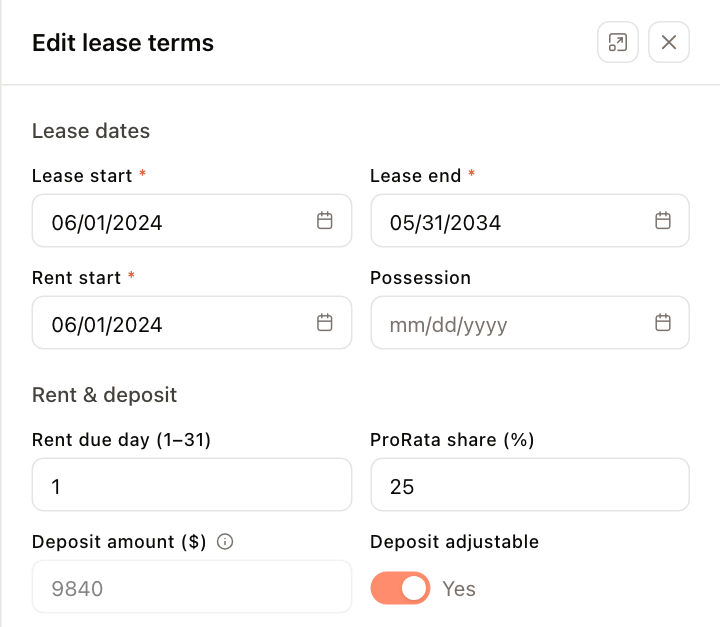
- In Lease Info, click the pencil (Edit lease terms). You can also choose Edit lease terms from the … menu in the tenant header.
- Change what you need:
- Lease dates — Lease start, Lease end, Rent start and Possession.
- Rent & deposit — Rent due day (1–31), ProRata share (%) and Deposit adjustable.
- Insurance & liability — Insurance expiration and Liability insurance.
- Late fee — turn it on, choose the Type (Percent (%) or Flat rate ($)), enter the Amount, and enter After day (1–31), the day of the month after which the fee applies.
- Admin fee — turn it on, choose the Type and enter the Amount.
- Click Save changes.
Note
Deposit amount ($) is read-only here. The held deposit is set when the tenant is created and changes through payments and credits. To adjust it, go to Financials > Credits. See Issue a tenant credit.
Note
Changing lease terms requires permission to edit tenants.
Change the rent itself
The lease terms don't hold the rent amount. Rent comes from the rent breakdown — see Rent schedules and escalations. When you extend a lease, check that the rent breakdown covers the new term as well.