
At the start of each year, NNN tenants' escrow payments for the previous year are reconciled against what the property actually spent on real estate tax, CAM and insurance. A tenant who paid less than their share owes the difference; a tenant who paid more is due a credit.
Review the reconciliation
- Open the property, click the Budget tab, and select Reconciliation at the top.
- Choose the billing year to reconcile from the year list.
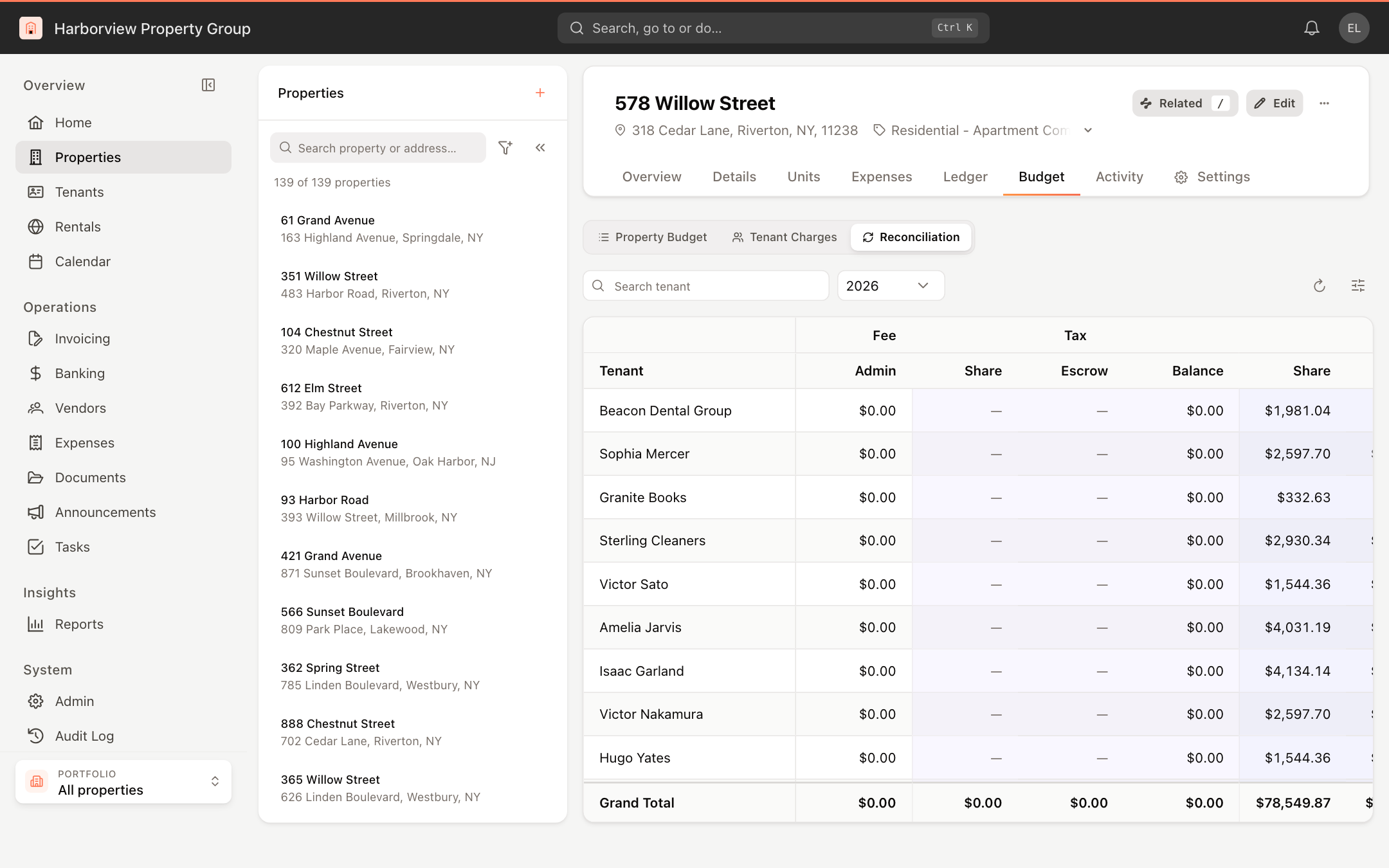
Each row is a tenant. The Admin column shows the tenant's admin fee. For each of Tax, CAM and Insurance there are three columns:
- Share: the tenant's share for the year, based on their lease terms and the property's actual expenses.
- Escrow: what the tenant was charged toward it during the year.
- Balance: Share minus Escrow. A positive balance is owed by the tenant; a negative balance is a refund due to the tenant.
The Grand Total row adds up every tenant. Use Search tenant to find one.
To show summary cards for Tenants, Budget share (all), Escrow collected (all) and Net balance due (or Net refund), click Display settings and choose Show under Summary.
See how a tenant's share was worked out
Click a tenant's row to open their details:
- Property data: the property's actual Tax expense, CAM expense and Insurance expense for the year.
- Tenant data: the tenant's pro-rata share and, for each of Tax, CAM and Insurance, the basis they pay on and any base-year amount.
- NNN config: any category-level CAM exclusions or limits on the tenant's lease.

To correct a tenant's basis or base-year amount, change their lease. See How CAM, tax and insurance shares are configured.
Produce the reconciliation statement
The Reconciliation view is for review only; it doesn't change invoices. For a statement you can send to tenants, run the CAM Reconciliation Report from Reports. It shows each tenant's premises, recoverable expenses, escrow summary and NNN notes for the selected budget year. See Run and export reports and the report catalog.
To bill a balance or refund a credit, add a charge to the tenant's next invoice or issue a credit. See Add charges to invoices and Issue a tenant credit.