
Templates let you write a letter or notice once and fill it with a tenant's or a property's details whenever you need it — for example a rent increase notice. Generated documents are saved to the record's documents automatically.
Create a template
In the sidebar, click Documents, then the Templates tab.
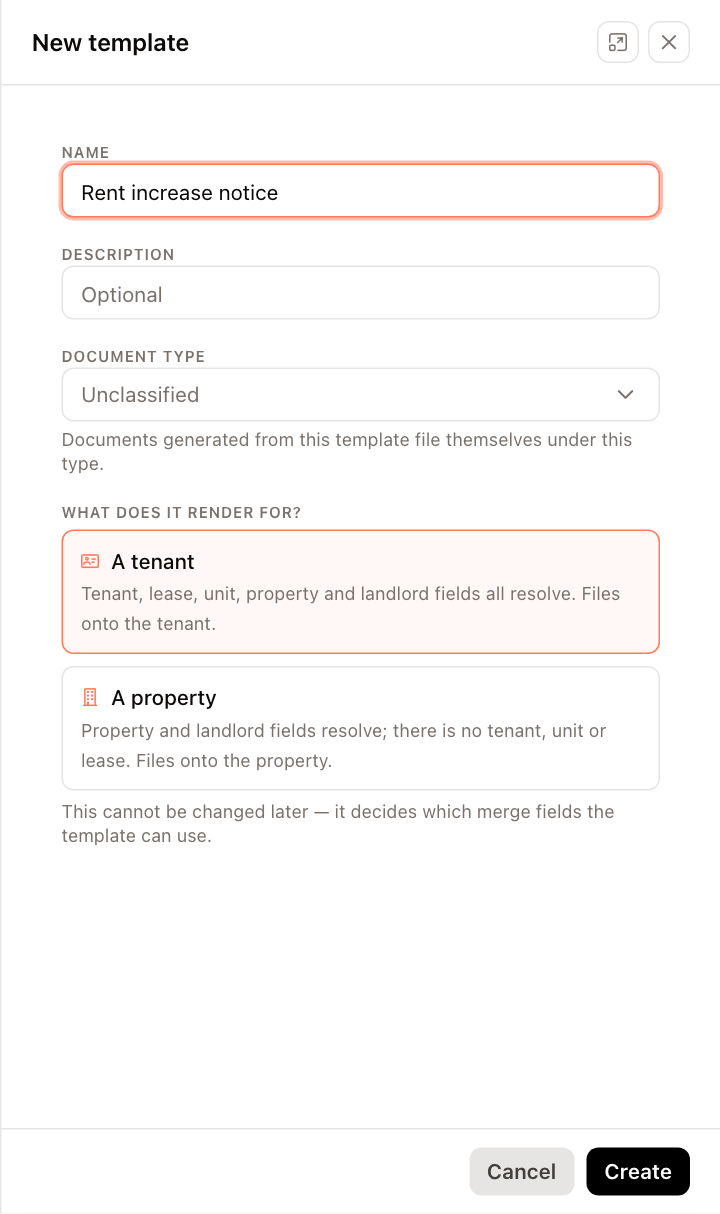
Click New template.
Enter a Name and optional Description, and choose a Document type. Documents generated from the template are filed under that type.
Under What does it render for?, choose:
- A tenant — tenant, lease, unit, property and landlord fields are available. Generated documents are filed on the tenant.
- A property — property and landlord fields are available. Generated documents are filed on the property.
This can't be changed later.
Click Create. The template editor opens.
Write the template
In the editor:
- Write the document on the page, using the toolbar for formatting.
- Click a field under Merge fields on the right to insert it at the cursor, or drag it onto the page. Hover over a field to see an example value.
- Use undo and redo, and the sliders icon to edit the template's name, description and type.
- Click Save. The Unsaved changes badge shows when you have changes that aren't saved yet.
If the template contains fields that this kind of template can't fill, a warning lists them; they print as typed.
Publish and generate a document
A new template starts as Draft. Click Publish to make it Live; click Unpublish to return it to draft.
- Click Preview with real data.
- Choose the tenant or property under Preview for. The page shows the document filled with that record's data.
- Click Generate document.
The document is saved on the tenant's or property's Documents tab. Generate document is available only when the template is published, saved, and a record is chosen; hover over it to see what's missing.
Creating, editing and generating from templates requires permission to manage document templates.